Brain node
Which AI model an agent uses, and how the credentials for it are supplied. Every Agent node is connected to exactly one Brain node on the canvas.

Three modes
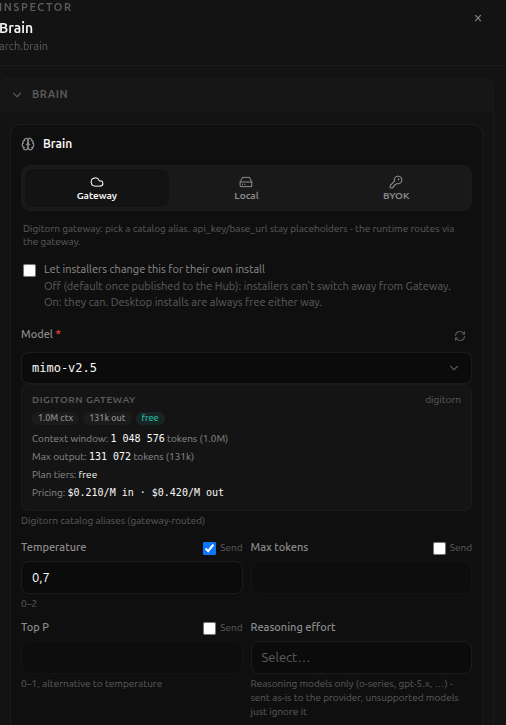
- Gateway - Digitorn-hosted models, no API key stored in the app. Pick
a catalog alias; the runtime routes the call through Digitorn's gateway,
and
api_key/base_urlstay placeholders in the YAML. - Local - Ollama, LM Studio, or vLLM running on the machine the daemon
itself is on. Hidden on a cloud install (nothing there can reach
localhoston a visitor's own machine), unless the app was already wired to Local before switching - an already-Local app keeps its tab so it stays editable, but a cloud app can't newly switch into it. - BYOK - a credential from the signed-in user's own vault (OpenAI, Anthropic, and the rest).
Let installers change this for their own install - off by default once published to the Hub (installers can't switch away from Gateway); on lets them. Desktop installs are always free to switch either way, regardless of this setting.
Once a model is picked, Studio shows its real catalog data live: context window size, max output tokens, plan tier, and per-token pricing - not static text, this comes from the actual gateway catalog at the moment you open the panel.
Fields
- Model (required). Digitorn catalog aliases are gateway-routed.
- Temperature (optional, with a Send toggle - unchecked, the field is not sent to the provider at all, even if it has a value), 0-2.
- Max tokens (optional, with its own Send toggle).
- Top P (optional, with its own Send toggle), 0-1, an alternative to temperature.
- Reasoning effort (optional), for reasoning models only (o-series, gpt-5.x, ...) - sent as-is to the provider, and unsupported models just ignore it.
- Context window (collapsible, optional overrides).
- Multimodal and advanced (collapsible, optional overrides).
Fallback brain
A second, complete brain configuration (provider, model, backend, temperature, max tokens) used when the main brain cannot answer. Added from the Brain panel's Add fallback brain button; once present it has all the same fields as a primary brain, just under its own Fallback section.