Agent node
One AI agent in the app. Connect it to a Brain (which model it uses), Modules (which tools it can call), and the Runtime node (how it runs) on the canvas.
Identity and Prompt
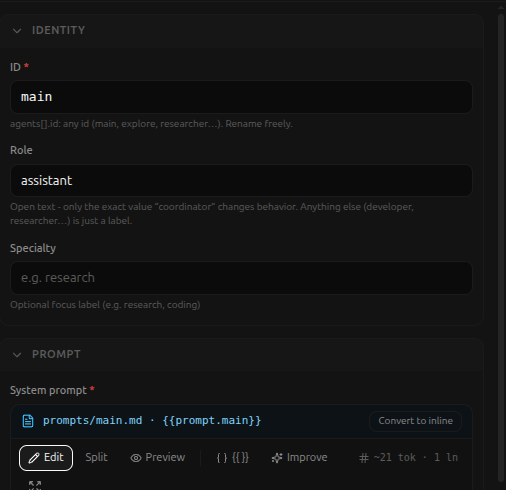
-
ID (required), the agent's name inside the app. Renaming it updates every place that refers to it, automatically.
-
Role (default
assistant) - open text; only the exact valuecoordinatorchanges behavior (required for multi-agent delegation without an explicitentry_agent). Anything else is just a label. -
Specialty (optional), e.g.
research,coding. -
System prompt (required), the agent's core instructions, written once, not per-conversation. Supports
{{app.x}},{{env.x}},{{secret.x}},{{prompt.X}},{{skill.X}},{{workspace}}. Cannot see live conversation messages or trigger data - it's fixed before the app ever runs. Left empty, the agent still runs on its role/specialty alone.In this example the prompt is stored in a separate file (
prompts/main.md, referenced as{{prompt.main}}) rather than typed inline - a Convert to inline button switches between the two. The editor itself has Edit / Split / Preview modes, an Improve button, and a live token count. -
Plan first (boolean, default off).
-
Instructions file (optional), loads instructions from a bundle file instead of
system_prompt. -
Max tool iterations (optional), caps this agent's tool calls per turn, overriding the Runtime node's Max turns.
Modules
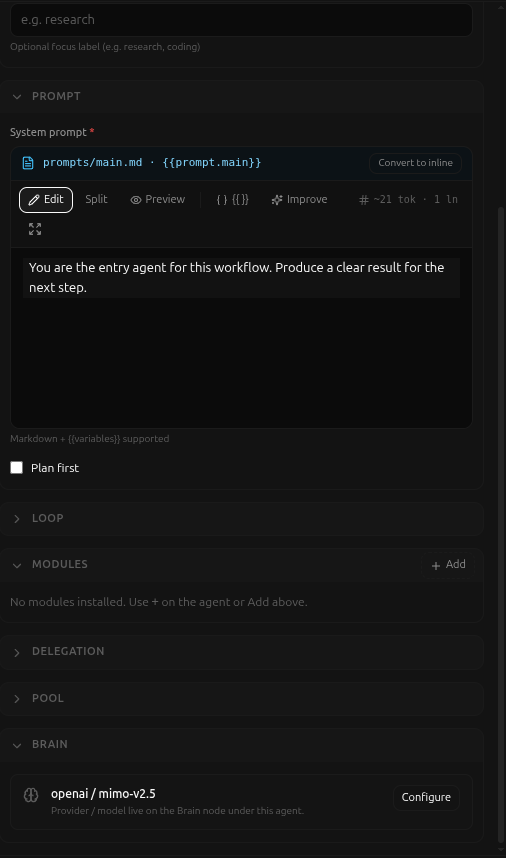
An agent can only use tools it has been explicitly granted. With nothing granted yet, the panel says so directly: "No modules installed. Use + on the agent or Add above." The + on the agent's own canvas card opens a palette of installable modules:

Picking one adds a module node wired to this agent, granting it that
module's tools. There is also a Module grants (advanced, JSON) escape
hatch on the panel itself for a manual override
({ "filesystem": ["*"], "bash": ["*"] }) - most people won't need it,
prefer wiring a module node from the canvas instead.
Delegation and Pool
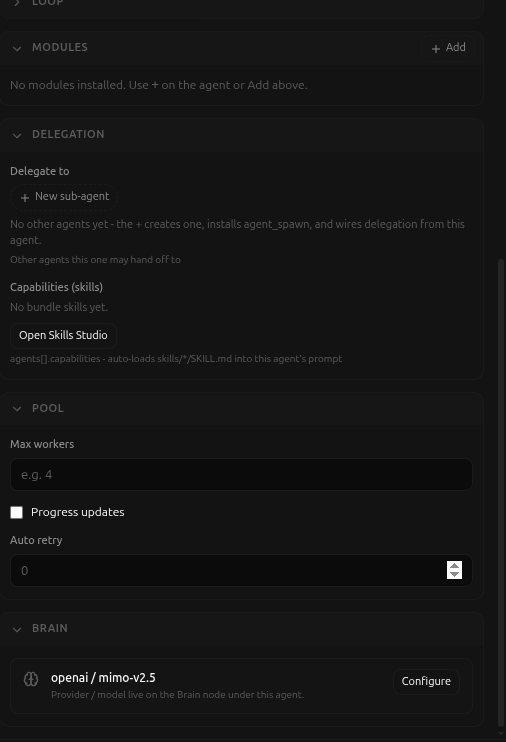
- Delegate to - other agents this one may hand off to. + New
sub-agent creates one, installs the
agent_spawnmodule, and wires delegation from this agent - confirmed live: with no other agents in the app, the panel explains exactly this rather than showing an empty list. - Capabilities (skills) - bundled skill files this agent loads.
No bundle skills yetuntil at least one exists; Open Skills Studio is the shortcut to add one. Per the panel's own note,agents[].capabilitiesauto-loadsskills/*/SKILL.mdinto this agent's prompt. - Pool - worker-pool settings for running several instances of this agent concurrently: Max workers, a Progress updates toggle, and Auto retry (a retry count, default 0).
- Brain - a read-only summary of the connected Brain node
(
openai / mimo-v2.5in this example) with a Configure shortcut that jumps straight to that node's own panel, rather than duplicating its fields here.