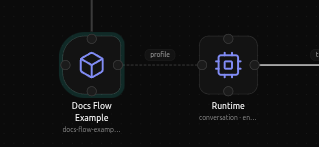
App node
Every Digitorn app begins with this node. Set App ID, name, and description
before wiring agents or flow steps - these fields also power the app's
store card and chat chrome. This is the Architecture-view counterpart of
app.yaml's top-level app: block.
Identity
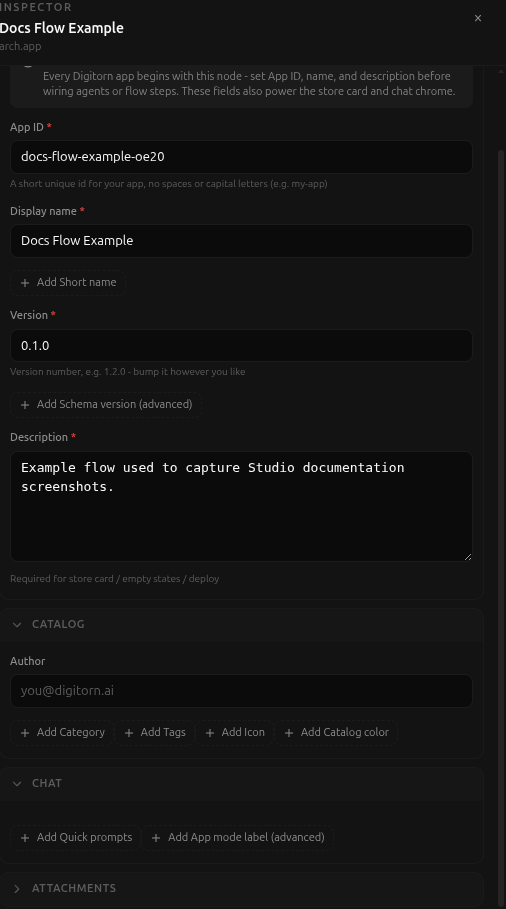
- App ID, a short unique id for the app, no spaces or capital letters
(
my-app). - Display name, shown in the catalog and chat header.
- Short name (optional), a compact label for tight UI.
- Version, e.g.
1.2.0- bump it however you like. - Schema version (advanced, optional), the internal YAML format version. Leave empty unless you know you need it.
- Description, required for the store card, empty states, and deploy.
Catalog
- Author (optional).
- Category (optional), one of a fixed list: coding, writing, research, data, devops, design, communication, automation, general, developer-tools, development, productivity, education, ai, support, assistant, creative.
- Tags (optional), free-form, used for catalog search.
- Icon (optional), shown on the app's catalog card. Leave empty for an auto-generated colored tile.
- Catalog color (optional), a hex accent color for the app card. The UI node's Visual section can override this inside chat itself.
Chat
- Quick prompts (optional), one-click suggestions shown on the empty conversation screen - each has a label, a message, and an optional icon.
- App mode label (advanced, optional) - just a note for yourself, it does not change how the app runs. To actually choose how the app behaves (chat / one-shot / scheduled), use the Runtime node's Mode field instead - a distinction worth remembering, since the two fields have similar-sounding names but only one of them is real.
Attachments
- Allowed attachments (optional): which attachment kinds the client may offer - image, document, audio, video.